How the Odds Screen works
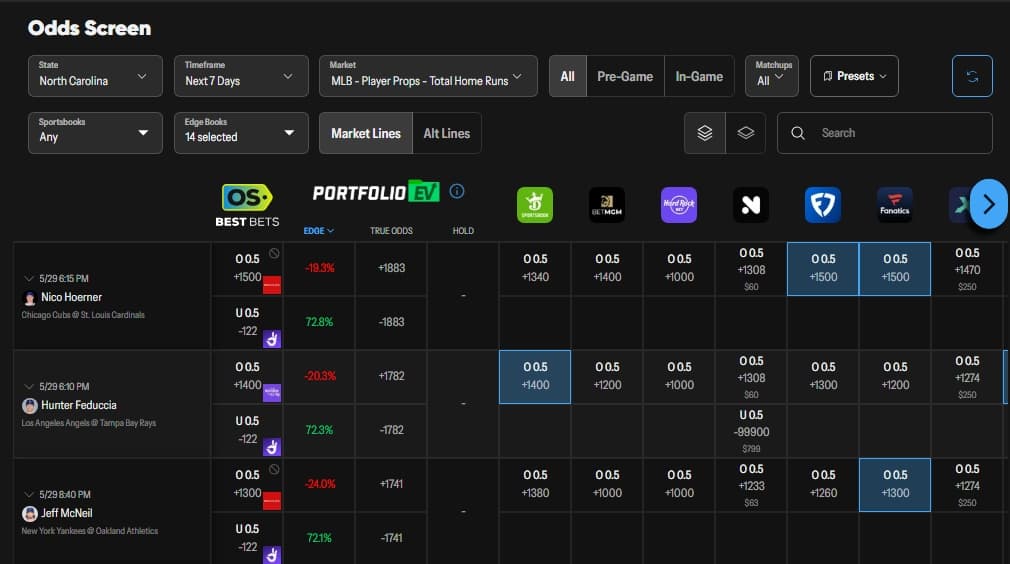
The Odds Screen replaces the manual workflow of opening a dozen sportsbook apps to compare prices. It pulls live odds from every U.S. sportsbook available in the bettor's state, calculates a no-vig True Odds fair price from a chosen set of sharp Edge Books, and highlights every soft sportsbook line whose price beats the fair value.
The result is a single dashboard where every +EV opportunity is surfaced with the edge percentage already computed. Click a flagged line and the screen deep-links into the sportsbook's bet slip with the wager pre-loaded.
Using the Odds Screen effectively
- Set state, timeframe, league, and market filters. Start by selecting the bettor’s state (controls which sportsbooks appear), the timeframe (Today, This Week, etc. — important for sports like the NFL where games post days in advance), the sport or league, and the market type. Game lines, player props, team props, alternates, and quarter or half markets can all be filtered independently.
- Build the Edge Books selection. Edge Books are the sportsbooks used to calculate True Odds. Choose sharp books like Pinnacle whose pricing is widely accepted as the market consensus. The tool averages the selected Edge Books, removes the vig, and produces the projected fair price for every market on the screen.
- Identify +EV bets. With Edge Books selected, compare every available sportsbook price against True Odds. When a sportsbook is offering a better number than True Odds, the tool flags that line as +EV and surfaces the edge percentage. The bettor can also see best available odds, sportsbook pricing differences, and exchange liquidity on each row.
- Deep-link directly to the sportsbook bet slip. Click the flagged odds to deep-link straight into the relevant sportsbook with the wager already loaded into the bet slip. The bettor confirms the stake on the sportsbook side — execution drops from "open the app, find the market, build the bet" to a single click plus confirmation.
Why the Odds Screen matters
Manually checking dozens of sportsbooks and thousands of markets is the bottleneck that prevents most retail bettors from compounding their edge. The Odds Screen compresses that scan into a filterable feed where every +EV opportunity is flagged and one-click placeable. For bettors who already know which markets they want to attack and prefer self-directed line shopping over an automated portfolio, the Odds Screen is the primary +EV surface inside OddsShopper.
Related glossary terms
- No-Vig / De-Vig Odds — the fair-price benchmark that powers the Odds Screen's True Odds calculation.
- Positive Expected Value (+EV) — the property the Odds Screen flags on every actionable line.
- Portfolio EV — the automated, daily-portfolio counterpart to the Odds Screen's self-directed flow.
- Closing Line Value (CLV) — the long-run scoreboard for whether bets sourced from the Odds Screen are consistently beating the market.
Try the Odds Screen
New users can start a 7-day OddsShopper free trial with promo code SHOP15 applied at checkout. The Odds Screen is included alongside Portfolio EV and the rest of the +EV suite during the trial.
Watch the walkthrough
Frequently Asked Questions
What is the OddsShopper Odds Screen?
The Odds Screen is OddsShopper's odds-comparison page that aggregates lines across U.S. sportsbooks, calculates a no-vig True Odds fair price for every market, and flags every line offering positive expected value relative to that price. Bettors filter by state, league, market type, and timeframe, then click a flagged line to deep-link straight into the sportsbook's bet slip with the wager pre-loaded.
How does True Odds get calculated?
True Odds is calculated by averaging the prices on the selected Edge Books for a given market and then removing the vig (the built-in sportsbook margin) from that average. The result is the projected fair-odds benchmark — the price the line should be at if the market were perfectly efficient. Every sportsbook price for that market is then measured against True Odds to identify +EV bets.
What are Edge Books on the Odds Screen?
Edge Books are the set of sportsbooks the bettor selects as the input to the True Odds calculation. Typically these are sharp books like Pinnacle whose prices are widely accepted as the most accurate market consensus. Choosing Edge Books deliberately matters — using soft recreational books as Edge Books produces an inaccurate fair price and weakens the entire +EV flag.
Does the Odds Screen support player props and alternates?
Yes, the Odds Screen supports player props, team props, alternate markets, and quarter and half markets in addition to standard game lines. Use the market-type filter to focus on the markets the bettor wants to attack. The timeframe filter is particularly useful for sports like the NFL where games are posted days in advance and a "Today" filter would hide future-day +EV opportunities.
How is the Odds Screen different from Portfolio EV?
The Odds Screen is a flat, real-time line-comparison and line-shopping view — the bettor scans, filters, and clicks. Portfolio EV pre-builds a daily ranked portfolio of bets sized to the bettor’s bankroll for one-click mass entry. The Odds Screen suits bettors who want full discovery control; Portfolio EV suits bettors who want a guided, automated daily workflow. Many users run both.