How To Use The OddsShopper Odds Screen To Find +EV Bets And The Best Price
The OddsShopper Odds Screen received a major overhaul that changes how you shop for bets. Instead of opening a stack of sportsbook apps and eyeballing which one has the better number, you get every price for every market on one page, with a fair "true odds" line telling you which bets are actually worth making.
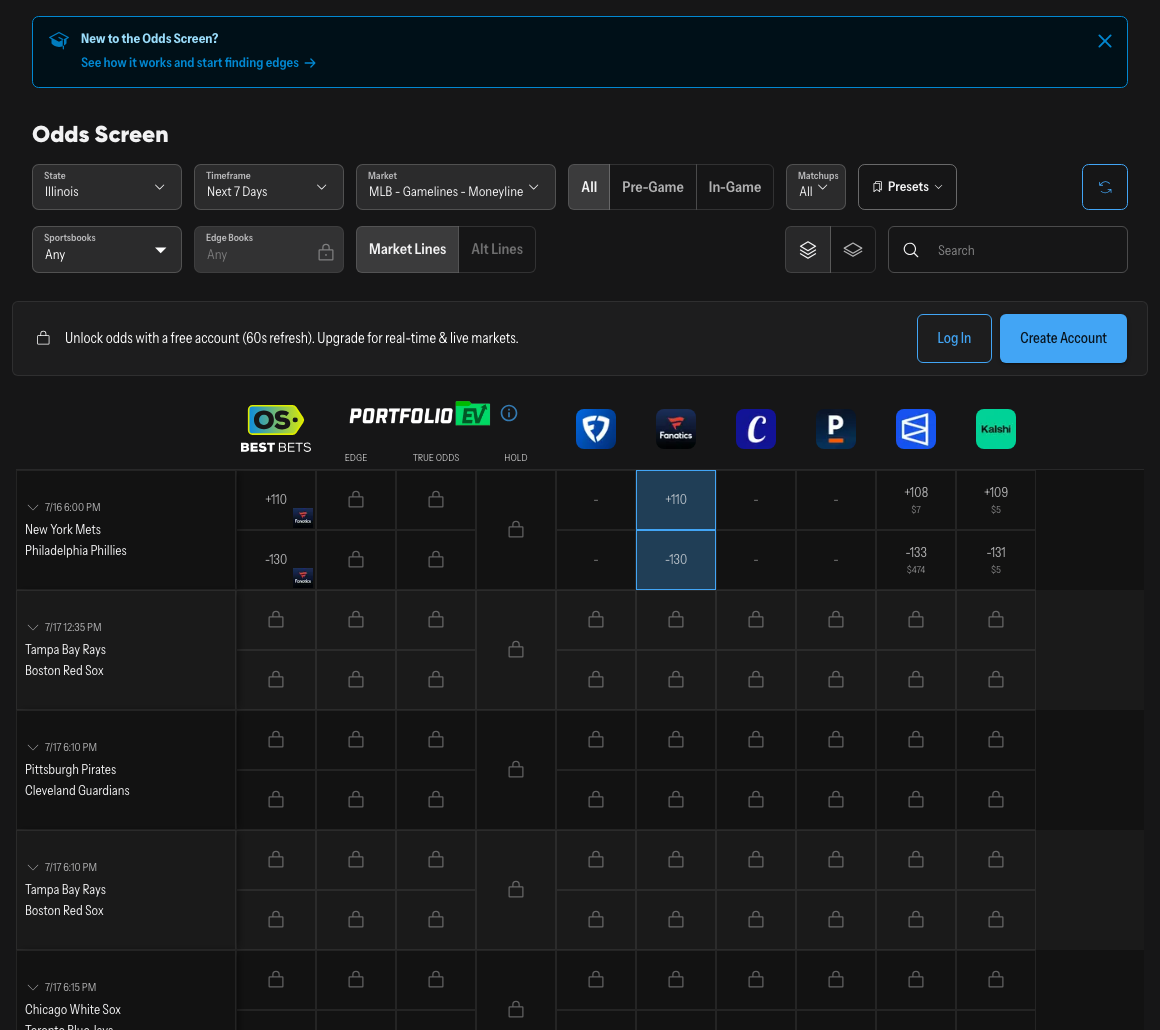
The OddsShopper Odds Screen.
In Summary
The Odds Screen (OddsShopper's Live Odds page) puts every book's prices for a market side by side, then layers a fair true odds number on top so you can see which offers are +EV, meaning priced better than they should be. You set a few filters (state, time frame, league, and bet category), pick your reference books, and the screen flags the bets where the best available price beats the true odds, shows you the exact edge, and even deep links you straight to that book's bet slip. This guide walks the page top to bottom: the settings, how the true odds get built, how to spot +EV value, why line shopping the best price matters, and how to place a bet without leaving the screen. Open it here: OddsShopper Odds Screen.
Watch: The OddsShopper Odds Screen Walkthrough
Here's the full Odds Screen walkthrough this guide is based on, so you can follow along on the actual page.
What Is The OddsShopper Odds Screen?
The Odds Screen is OddsShopper's live odds page: a single screen that pulls in prices from a long list of sportsbooks for every game and market, compares them, and tells you which numbers are good bets. To find it inside OddsShopper, click More, then Live Odds, and you land on the page.
What makes it more than a price-comparison table is the fair value it calculates. A normal odds comparison site only shows you who has the best number. The Odds Screen also shows you what the number should be, so "best price available" turns into "best price that's actually worth betting." That is the difference between shopping for a discount and shopping for a discount on something you actually want, and it's the feature we lean on most every time we open the page.
Set Up The Screen: State, Time Frame, League, And Category
Four settings at the top control what you see. Getting them right takes a few seconds and keeps the page focused on the bets you care about.
| Setting | What it does | When to change it |
|---|---|---|
| State | Defaults to your location, since book availability varies by state | Switch it from the dropdown to see another state's books |
| Time Frame | Today vs. a longer window like the next 7 days | Use Next 7 Days for sports that post lines early, like NFL games a week out |
| League | Filters the board to one of many supported leagues (NFL, NBA, MLB, and more) | Pick the league you're betting so only those games show |
| Category | Game Lines (moneyline, spread, total) or Player Props | Switch to Player Props for the full prop menu and projected fair numbers |
One detail worth knowing on the time frame: if it's Monday and you only have "Today" selected, you won't see the upcoming Sunday's NFL games. Switch to the longer window when you want to bet those markets in advance. And under Player Props you'll find a deep menu (three-pointers, steals, blocks, points by quarter or half, and many more), with a projected fair number generated for every one of them, not just the main lines.
A quick tip: when the board is busy, leave the category on Game Lines and the time frame on Today. Fewer rows on screen make the +EV bets far easier to spot. Open up props and future dates once you know what you're hunting for.
Edge Books And True Odds: How The Screen Spots +EV
This is the engine of the whole page. Under the filters, you choose your Edge Books, the reference sportsbooks the screen uses to build a fair price. OddsShopper averages the prices from the books you select, vig included, into a single True Odds number for every market: its best estimate of the fair market value of that bet. The blend we lean toward is a handful of books we consider sharp alongside a couple of recreational ones, so the projection reflects a broad read of the market rather than a single book's number. Make your selections and hit Save Filters to apply them. You can also use the Matchups tab to filter out individual games, or the book list on the right to limit which sportsbooks appear, though seeing all of them keeps every available price in view.
With your Edge Books set, every market shows a True Odds column (the fair price) next to the best number actually available to bet. When the available price beats the true odds, you have a +EV bet, and the screen tells you exactly how much edge it carries, such as a bet flagged with a 2% edge. That number is the whole point: instead of guessing whether a price is good, you can see the gap between what's offered and what OddsShopper estimates is fair.
A couple more things the screen surfaces on each bet:
- Liquidity On Exchanges. For exchange books like NoVig and Polymarket, the screen shows how much money is actually available at that price. That can vary widely between them — a number on NoVig might have only a few dollars behind it, while Polymarket often shows a ton of liquidity on the same game. As exchanges keep growing, knowing whether you can get $10 or $1,000 down at a price matters as much as the price itself.
- A One-Click Bet Link. A small note icon on a bet deep links you straight to that sportsbook with the wager already loaded in the bet slip. See the value, click, confirm, without retyping anything (more on this below).
Stop eyeballing which book is "good."The OddsShopper Odds Screen builds a fair true-odds line from your reference books and flags every price that beats it, with the exact edge shown. New to OddsShopper? It scans the whole market and surfaces the +EV bets for you automatically. Code EDGE20 takes 20% off your first payment of OS Pro or OS Core.
Why +EV Is The Edge Worth Chasing
If you're newer to this, "+EV" stands for positive expected value: a bet priced better than its true probability of winning, which is what makes money over a large sample. Every odds number is really a probability in disguise — the implied probability baked into the price. Here's the shortcut the Odds Screen gives you: the True Odds column is that implied-probability read, already computed, so you can see the fair chance of an outcome without doing any conversion yourself. American odds convert to an implied chance of winning:
| Odds | Implied win probability | What it pays on $100 |
|---|---|---|
| -150 | 60.0% | $66.67 profit |
| +120 | 45.5% | $120 profit |
| +150 | 40.0% | $150 profit |
| +220 | 31.3% | $220 profit |
The takeaway: a longer price is a better price for the same outcome. Say the true odds put a team's real chance to win at about 31%, which makes +220 (implying 31.3%) the fair, break-even price. A price longer than +220 is the +EV bet; a price shorter underpays you. So if another book is offering that same team at +150, that price implies a 40% chance of winning, well above the truth, and it underpays you badly for the risk you're taking. On the identical bet, +220 beats +150 every single time: same outcome, much bigger payout. That comparison runs for you automatically — the true odds tell you the fair probability, and the screen flags the books offering a price longer than fair. You won't win every +EV bet, but consistently taking prices better than the true number is what tilts the math in your favor over a large sample. +EV is the mathematical foundation, but it works best paired with the basics every bettor needs — sensible bankroll management and the patience to ride out variance — not as a shortcut around them.
Line Shopping: Always Take The Best Number
Even after you've found a +EV bet, where you place it matters. The same wager can be priced differently at every book, and that gap is value you should never give away. Every supported sportsbook's price sits in the same row, with the best available number called out, and you can scroll right to see the full list book by book. That list spans every major sportsbook — DraftKings, FanDuel, BetMGM, and Caesars among them — plus exchanges like NoVig and Polymarket, so the best price is never hiding in an app you didn't think to open. It works the same whether you're shopping a live NBA moneyline or lining up an NFL odds comparison a week ahead of Sunday — same page, same fair line, every book in one row.
The rule is simple: always secure the best available number. Betting something at +400 when the exact same wager is sitting at +500 somewhere else costs you a meaningfully bigger payout on a bet you were going to make anyway. Line shopping is the most reliable edge in betting because it costs you nothing, and the Odds Screen makes it instant instead of you tabbing through a stack of apps.
The habit that pays for itself.Line shopping is an edge available to every bettor at every stake, and it applies on every bet you make. Even if you only ever used the Odds Screen to grab the best number on bets you'd already decided to make, you'd be paying better prices across the board over a full season. The +EV flags are the upgrade on top of that.
Bet Straight From The Screen
Once you've found a +EV price at the best available book, there's no need to leave the page. Click the note icon on the bet and it deep links directly to that sportsbook with the odds already loaded into your bet slip. You go from spotting the value to a pre-filled ticket in one click: no searching the book's app for the right market, no retyping the wager, far less risk that the line drifts while you hunt for it.
One habit worth keeping even with the deep link: glance at the price on the bet slip before you confirm. Live markets move, and a number can shift in the seconds between the flag on the screen and the sportsbook loading your ticket. If it's still longer than the true odds, submit; if the book has already shortened it past fair, the edge is gone and it's fine to pass. The screen finds the value fast, but the final check is yours.
A Simple +EV Example
Say you're on the Odds Screen looking at an NBA game. Your Edge Books produce a true odds of +120 on an underdog moneyline, a fair win probability of about 45%. You scroll the row and one book is offering that same team at +135. Because +135 (about 42.6% implied) pays more than the fair +120, you're getting a price longer than the true odds, so it's a +EV bet, and the screen flags the edge for you. You take the +135, the best available number, and click straight through to the book to place it.
That's the entire workflow on one page. The screen built the fair line, compared it to every book's offer, found the spot where the market mispriced the bet, pointed you to the best price, and handed you the bet slip. Multiply that across dozens of leagues and thousands of markets every day and you can see why a single screen replaces a stack of open apps — the underdog moneyline above is exactly the kind of spot we look for, because the fair line does the hard part and you just take the longer price.
If you'd rather see plays already surfaced for you while you get the hang of the screen, OddsShopper's free expert picks show the same +EV thinking applied to today's games — a useful reference point for what a real edge looks like before you go hunting your own.
Frequently Asked Questions
Is the OddsShopper Odds Screen free to use? OddsShopper has a free tier — you can sign up free and use its core odds tools at no cost. OS Pro unlocks the deeper layer: more leagues and markets, live arbitrage, and the full tool suite. Code EDGE20 takes 20% off your first payment of OS Pro or OS Core.
How do I find the Odds Screen in OddsShopper? Click More, then Live Odds, and you're on the page. Set your state, time frame, league, and bet category at the top.
What are Edge Books and true odds? Edge Books are the reference sportsbooks you pick to build a fair price. OddsShopper blends their prices into a single true odds number for each market, which is the fair market value. When an available price beats the true odds, that's a +EV bet, and the screen shows the exact edge percentage so you don't have to calculate it yourself.
Does the Odds Screen work for player props? Yes. Switch the category to Player Props and you get a deep menu — three-pointers, steals, blocks, points by quarter or half, and many more — each with its own projected fair number, not just the main game lines.
Can I place a bet directly from the Odds Screen? Yes. The note icon on a bet deep links to that sportsbook with the wager already loaded in your bet slip, so you can confirm it in one click.
Why does +220 beat +150 on the same bet? A longer price pays more for the same outcome. If both numbers represent the same team in the same game, +220 returns far more than +150, so the better price is the smarter bet. OddsShopper always shows you the best available number across books.
The OddsShopper Odds Screen turns "which book has the better line?" into a solved problem: it builds a fair true-odds price, flags every +EV bet across the market, shows the best available number, and links you straight to the bet slip, across dozens of leagues and thousands of markets. Get 20% off OS Pro or OS Core with code EDGE20 on your first payment.
More on this: How To Use The OddsShopper +EV Tool: A Beginner Guide · How To Use OddsShopper Pro: Your First 10 Minutes · OddsShopper In-Game EV Screen: Customize Your Edge · How To Use OddsShopper Portfolio EV: Full Tutorial · How To Use Prediction Markets: A Bettor's Complete Guide