Most people who run the OddsShopper In-Game EV Screen already know it finds +EV bets on live games almost around the clock. What they never touch is the layer underneath the default view: the filters, the edgebooks, and the presets that let you decide where your edge comes from and which bets ever reach your screen. That customization is the difference between watching a busy feed and running a tight, personal live-betting operation.
This walkthrough stays on the tool itself. For the case for why live markets are beatable and how to read a single flagged bet, that lives in our live +EV betting guide and the broader live betting strategy guide.
Watch: The In-Game EV Screen Walkthrough
The walkthrough covers the main filters, custom edgebooks, notifications, deep-linking, presets, and event exclusions, shown live on the screen.
Why Main Lines Change The Live Betting Math
The first thing worth understanding is what the screen surfaces. It carries player props, but it can also be set to main lines only, and that switch matters more in-game than anywhere else.
Prop markets are thinner. Books hold lower limits on them and can limit you far quicker there, so even when you find an edge, you often cannot get much money down before the books shut you out. Live main lines, the gamelines on the game itself, carry higher limits than props. When you pull your live +EV bets from main lines, the edges you find are ones you can actually bet at a size that matters.
So the first customization decision is strategic, not cosmetic: do you want the volume of props, or the higher ceilings of main lines? The market-type filter lets you set it either way.
Why it mattersAn edge you cannot bet at size is not much of an edge. Filtering to main lines trades some volume for the room to actually get money down before a book limits you.
Build Your Own Edge With Custom Edgebooks
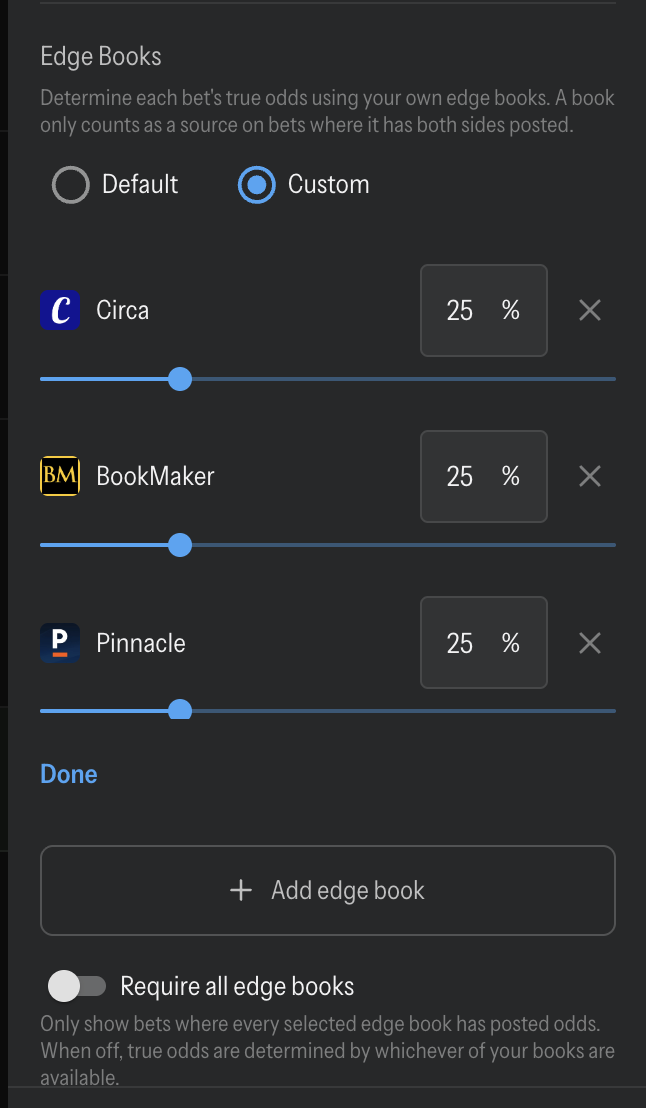
Custom edgebooks are where the screen becomes more than a default odds view. A +EV bet is only as good as the fair price you measure it against, and edgebooks are where you decide which books set that price.
You can run on the default sources and be fine. But if you have an opinion about which books are sharpest, you can build a custom edgebook, for example weighting FanDuel 🎁, Circa, Bookmaker, and Pinnacle, and then adjust each one's weight by how important it is to your EV calculation. A book you consider the sharpest in the market can carry more weight than the rest.
Those books and weights feed directly into the EV calculation, so your custom edgebook changes which live odds get flagged as +EV in the first place. Because that fair price is built from your weighted sources, two bettors running the same screen can see different bets flagged. Still deciding which books deserve the weight? Our guide to following sharp money and the piece on removing the vig explain what makes a book a reliable price-setter.
TipYour edgebook is your edge. Two bettors can run the same screen and see different bets flagged purely because they weight their sharp sources differently. Set it deliberately, not on default, once you have a view on which books are sharpest.
Filter Down To The Bets You Actually Want
Once your edge book is set, the rest of the filters trim a busy live feed down to the bets that fit how you bet:
| Filter | What it does |
|---|---|
| Bankroll | Turns each bet's recommendation into a real dollar stake sized to your bankroll |
| Strategy | Choose aggressive or conservative sizing, whichever you are comfortable with |
| Sports & Leagues | 44 sports and leagues to include or exclude |
| Sportsbooks | 39 books to choose from, so you only see prices where you actually have an account |
| Custom Edgebooks | Pick and weight the sharp sources that set your true price |
| Market Type | Main lines only, props only, or both |
| EV Range | Set a minimum and maximum EV so only bets in your target band show |
| Odds Range | Bound the prices you see, for example -300 to +600 |
| Game Status | All in-game bets, only bets at a break, only games at a break, or timeouts |
A couple of these are worth a closer look.
EV and odds ranges keep your screen honest. If you only want plus-money spots, set the odds floor and the minus-money prices drop off. If you only want bets above a certain projected value, the EV floor does the same. You are not scrolling past bets you were never going to place.
Game status is the setting that makes live betting practical. Live numbers can move in seconds, so filtering to bets at a break or a timeout gives you lines that don't move as quick and hold still long enough to get the bet down at the price you saw. We cover that mechanic further in the live +EV betting guide.
Size Every Live Bet To Your Bankroll
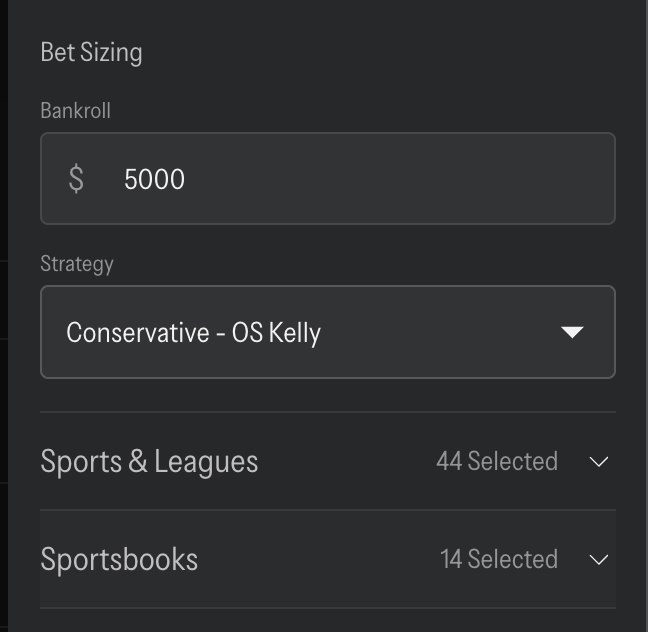
Enter your bankroll and the screen stops giving you generic advice and starts recommending a real stake for every bet it flags. The size scales with the odds: with a $5000 bankroll and conservative betting approach, a longshot around 11-to-1 might come back with an $11 recommendation, while a heavy -700 favorite returns something closer to $200. Shorter prices mean bigger recommended stakes, because the same edge on a favorite justifies more money than the same edge on a longshot.
Pair that with your strategy setting, aggressive or conservative, and you get sizing that matches how you like to play instead of a round number you picked by feel. Consistent, edge-aware sizing is what keeps a +EV approach intact over a long run of live bets; the fundamentals behind it are in our bankroll management guide.
Catch More Live Edges: Alerts, Deep Links, And New Tabs
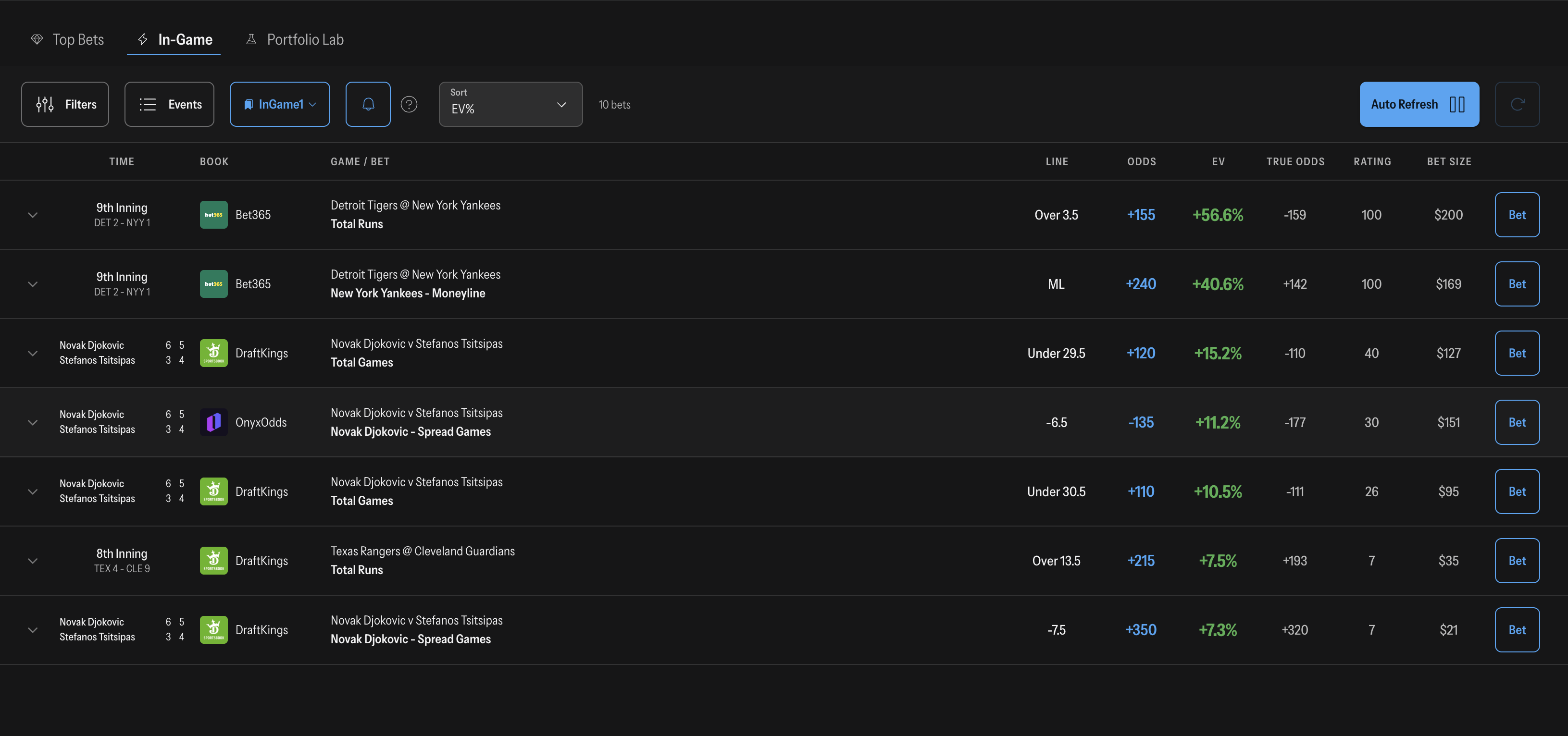
Live edges disappear fast, so the tool is built for speed once your filters are locked:
- Auto-Refresh keeps the whole screen updating on its own (every three seconds), so you are always looking at current prices.
- Desktop Notifications ping you the moment a new qualifying bet appears, so you can snipe it immediately instead of babysitting the screen.
- Clicking Bet drops the wager straight into your sportsbook's bet slip, which matters more in-game than anywhere else because the number can be gone by the time you enter it by hand.
- Expand Any Bet for a full odds comparison across every other sportsbook, so you can confirm you are taking the best available number before you fire.
- Open In New Windows Or Tabs, plus external-monitor detection, so you can fire several bets without losing your place on the screen.
- Deep-Linking Toggle lets you show all bets or only the ones that deep-link directly into your slip, if you only want the fastest-to-place spots.
It all points one direction: the faster you go from flagged to placed, the more of the edge you capture before the market corrects.
Save Presets And Exclude Events You're Done With
The last two features are what make all of the above worth setting up once.
Presets save a full filter configuration under a name, say an "In-Game 1" setup for main lines and a separate one for props, and load it every time you open the screen. You build your ideal view once and it is waiting for you the next day, no re-configuring.
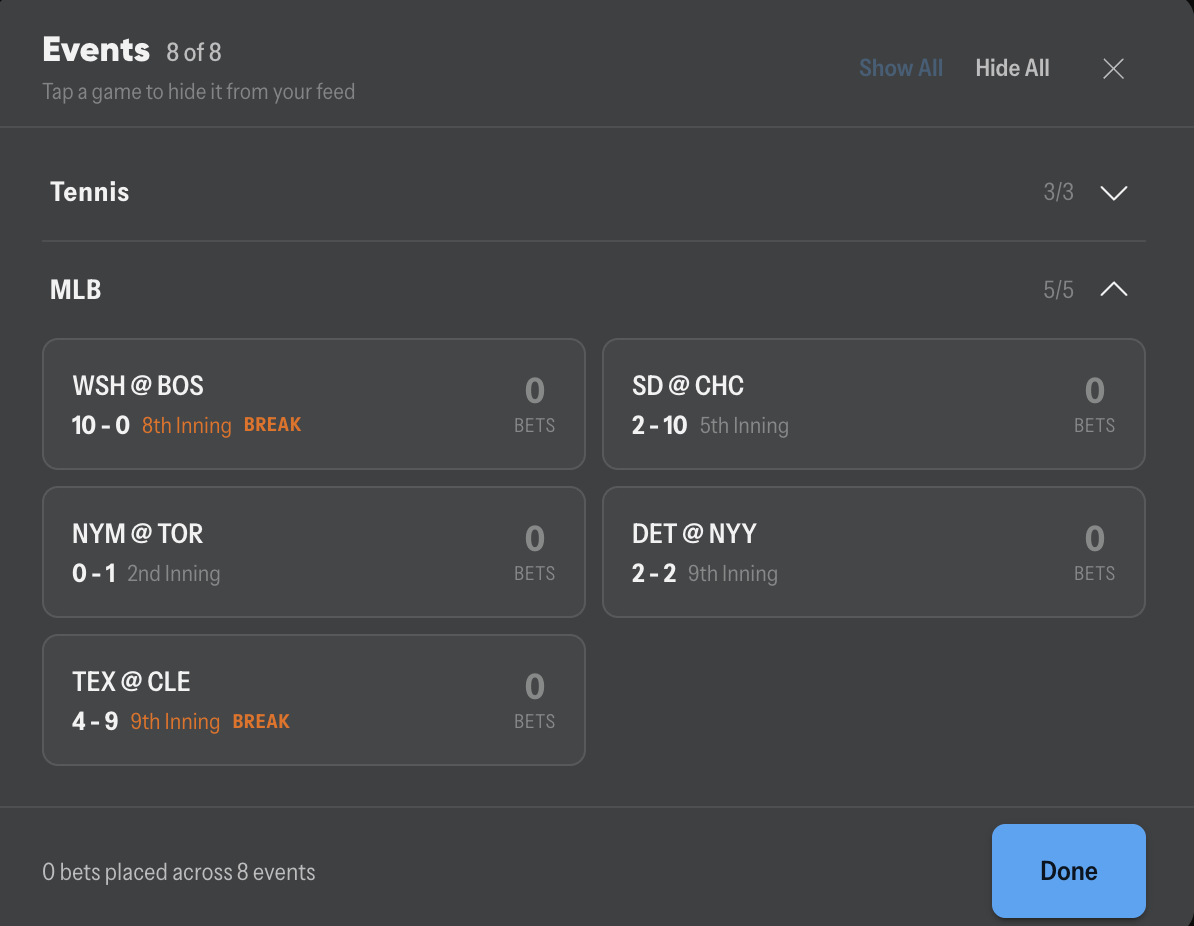
Event exclusions let you hide a specific game or event so its bets stop appearing. The practical use is exposure control: once you have bet enough on a single game, exclude it, and the screen stops tempting you to pile more onto a position you are already deep in. It is a simple guardrail that keeps you from over-concentrating on one event.
Between the two, the filters build your edge, the presets bring it back every day, and the notifications make sure you are there when a bet worth taking pops up.
How I Set Up My Screen: A Worked Example
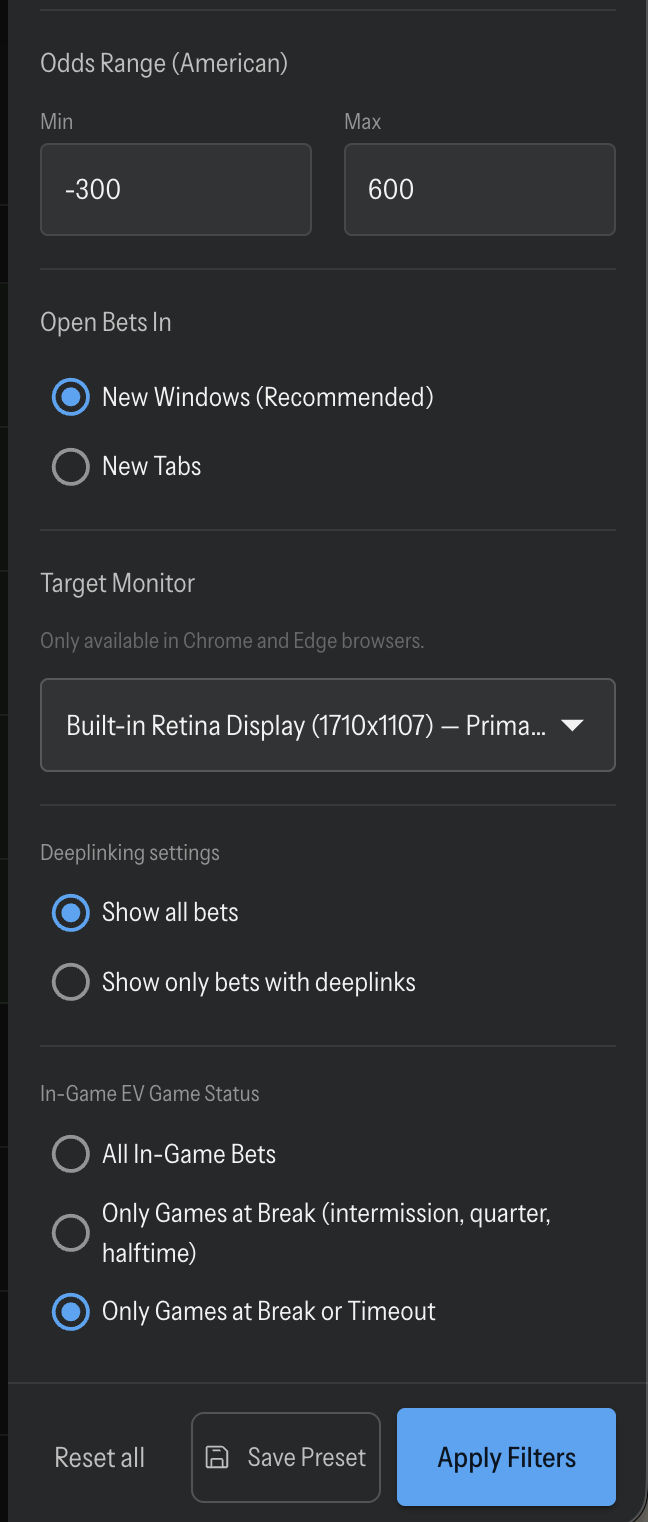
Here is how these settings come together in practice. When I want higher limits, I set the market type to main lines only and build an edgebook that leans on the books I trust most to set an honest number, weighting the sharpest sources heavier than the rest. I put a floor on the EV range so only real edges show, and I bound the odds range, for example -300 to +600, so I am not looking at prices I would never bet. Then I flip game status to only bets at a break so the lines hold still long enough to place, and I turn on desktop notifications so I do not have to stare at the screen.
I save that whole configuration as a preset, call it "In-Game 1," and it loads that way every time. If I get heavy on one game during a session, I exclude that event so its bets stop appearing and I do not over-concentrate. The result is a screen that shows me main-line bets, at prices I want, on games I can actually get down, sized to my bankroll, with a desktop notification when a new qualifying bet appears. That is the whole setup, built once and reused every day.
Frequently Asked Questions
What is the OddsShopper In-Game EV Screen? It is a live betting tool that reads in-game markets across the books, flags bets where the offered price beats the true price, and lets you filter, size, and place them. This article covers how to customize it; the live +EV betting guide covers how to read a single flagged bet.
What is a custom edgebook? It is the set of sportsbooks the tool uses to calculate the true, fair price of a bet, and the weight you assign each one. Choosing sharper books and weighting them more heavily means every live bet is priced against your own read of the market instead of a default.
Should I filter to main lines or props? Main lines (moneyline, spread, total) carry higher limits, so you can bet more before a book restricts you. Props offer more volume but thinner limits. The market-type filter lets you run either, or both, depending on whether you want size or volume.
How does the tool decide how much I should bet? You enter your bankroll and pick a strategy (aggressive or conservative), and it recommends a stake for each bet that scales with the odds, larger on short favorites, smaller on longshots.
How do I stop live lines from moving before I bet? Use the game-status filter to show only bets at a break or a timeout, when the line holds still, and turn on desktop notifications and one-click betting so you can place the wager the second it appears.
Bottom Line
The default In-Game EV Screen already finds live value. The customization is where you make it yours: weight your own sharp sources with a custom edgebook, filter to the markets and prices you want, size every bet to your bankroll, and save it all as a preset so it loads the way you like it every day. Set it up once and your filtered live bets stay in one place while you move quickly on prices that can disappear.
Have a question about your setup or want to compare edgebooks with other bettors? Jump into the OddsShopper Discord, the community there is happy to help you dial it in.
More on this: How To Use The OddsShopper Odds Screen To Find Value · LINDY'S LONG BALLS: A Day-Game Four-Peat Bid: Kalshi Odds · Kalshi Same Game Parlays: What You Can And Cannot Combine · What's New In OddsShopper Portfolios: The Full Rehaul · OddsShopper Winner: 850 Losses, a Five-Figure July